Whetstone
notify-me
✅ Open source (MIT) · ✅ Works with any agent that supports hooks
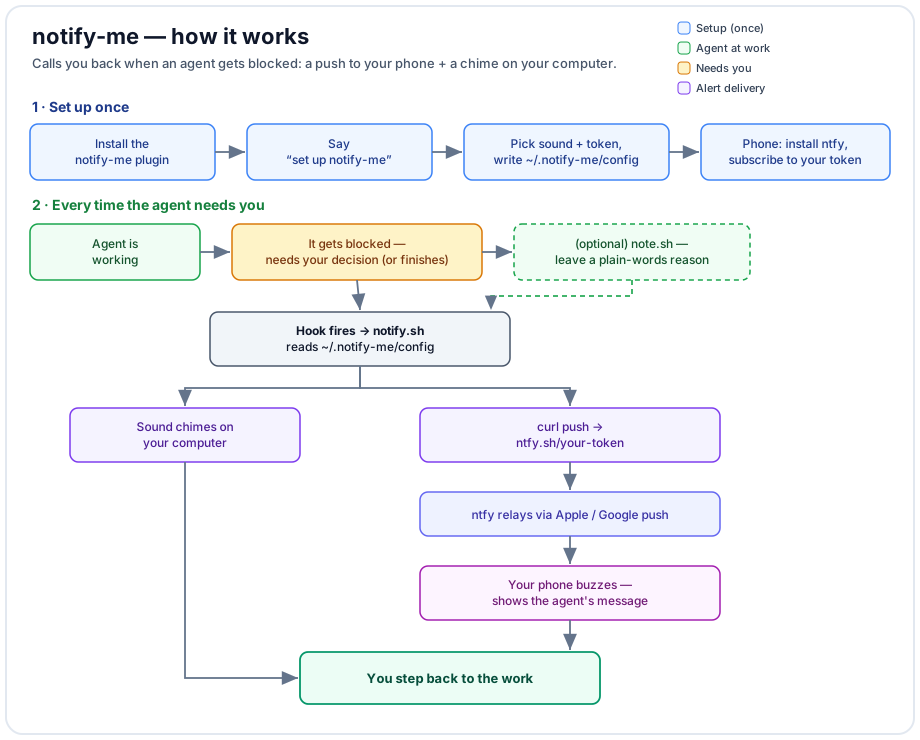
Calls you back when an agent needs you. The moment an agent gets blocked waiting on your decision (or needs permission to run something), notify-me pushes a notification to your phone and/or plays a sound on your computer — so you can step away and still know when you’re needed.
Works with any agent that supports plugin hooks. Free, no account, no background process, no residue.
Quick start
- Install the plugin.
- Say “set up notify-me” — the setup walks you through, in plain chat:
- Pick a sound from the system sounds found on your computer (preview before choosing).
- Sound on/off for the local chime.
- A private phone token you choose or have generated.
- On your phone: install the free ntfy app, subscribe to that token, and (optionally) set the phone’s alert sound inside the app.
- A test ping confirms both ends.
That’s it. From then on, when the agent gets blocked, your phone buzzes and your computer chimes.
How it works
A hook fires on two events:
| Event | Meaning | Default |
|---|---|---|
Notification |
the agent is blocked / waiting on you | on — high-priority push + sound |
Stop |
the agent finished a turn | off (fires every turn; opt in via NOTIFY_ON_STOP) |
Phone delivery uses ntfy.sh: the hook sends one curl to your private topic;
ntfy relays it through Apple/Google push to the ntfy app on your phone.
Task-aware messages
By default the push shows a generic line. To make it say, in plain language, what the agent needs, the agent leaves a one-line note right before it pauses:
bash "$CLAUDE_PLUGIN_ROOT/scripts/note.sh" "Editing your config — confirm whether to overwrite the old file?"
The next push uses that line (in whatever language it’s written), then clears it. Message priority is: explicit note → the agent’s own notification text → a generic default.
Settings — ~/.notify-me/config
| Field | Meaning | Default |
|---|---|---|
TOKEN |
private secret your phone subscribes to (the ntfy app calls it the “topic”) | (you choose) |
SOUND |
play a local computer sound — on/off |
on |
SOUND_FILE |
a sound-file path, or @system to follow your OS alert sound |
a system sound |
NOTIFY_ON_STOP |
also alert on turn-end — on/off |
off |
SERVER |
ntfy server base URL (change only if you self-host) | https://ntfy.sh |
The file holds your token, so setup makes it readable by you only (chmod 600). A config made by an earlier version can be fixed
the same way: chmod 600 ~/.notify-me/config.
A starting template is in config.example. Change anything later by saying
“change the notify-me sound / token, turn the chime off”, etc.
Good to know
- Privacy: on the public ntfy.sh server, the token is the password — anyone who knows it can read or send to it. Keep it private, or self-host ntfy and point
SERVERat it. - Phone sound is set inside the ntfy app per-topic; the computer can’t set it remotely.
- Local sound: a real sound file is more reliable than
@system, which follows the separate OS “alert volume” (easy to leave at zero). - One honest limitation: the
Notificationevent fires reliably when the agent needs a tool permission, and otherwise on an idle timeout (~60s). A question typed in chat without a permission request waits for that idle timer rather than firing instantly.
Platform support
- Local sound: macOS (
afplay/@systembeep), Linux (paplay/aplay), Windows (console beep). Auto-detected. - Sound picker: macOS and freedesktop Linux are scanned automatically; on other setups you can supply a path or use
@system. - Phone push: any platform with
curl.
Uninstall
- Remove your settings:
bash scripts/uninstall.sh(deletes~/.notify-me). - Remove the hook + scripts: disable or uninstall the notify-me plugin in your app.
License
MIT — see LICENSE.